Kinetyca GTM Systems

Everything you need to create motion across the funnel

AI Outbound Engine

Uses clean data and clear rules to book meetings across channels
Steps

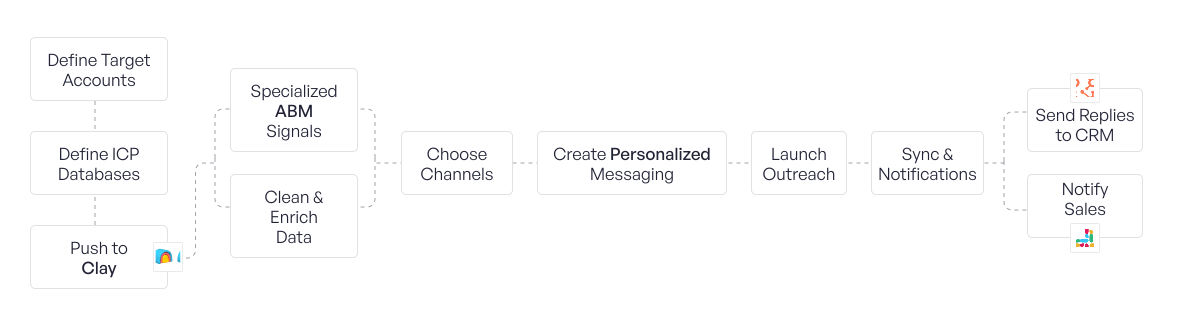
1. Define Target Accounts
We research and clearly define who to target using Gemini for ICP and market research.
2. Define ICP databases
We select the right data sources that best match your ICP using Apollo, ZoomInfo, and Ocean.io.
3. Push to Clay
All leads and accounts are sent into Clay to act as the central system.
4. Specialized ABM signals
We layer intent and account signals like hiring, funding, and buying interest using RB2B, Bambora, G2 and 20+ more.
5. Clean and enrich data
We fix bad data and fill missing fields in one place using Clay and data providers inside Clay.
6. Choose channels
We decide which channels each segment should receive, such as email, LinkedIn, or both.
7. Create personalized messaging
We generate personalized messages using Clay AI Agents and Clay workflows.
8. Launch outreach
We send messages across channels using Smartlead, HeyReach, and Instantly.
9. Sync and push notifications
Outreach activity and replies are synced automatically using Clay and automation workflows.
10. Send replies to CRM
Interested leads and results are pushed into HubSpot.
11. Notify sales
Sales teams are alerted in real time using Slack.

Tools

Define Target Accounts
Define ICP Databases
Push to Clay
Specialized ABM Signals
Clean & Enrich Data
Create Personalized Messaging
Launch Outreach
Send Replies to CRM
Notify Sales
Steps & Tools

ABM Signal Engine

Uses real-time account signals to trigger highly relevant, personalized outreach that converts into meetings and deals

Steps

1. Detect account signals
We identify accounts showing buying intent, website activity, competitor interest, ad engagement, or newsletter engagement using Common Room, Unify, RB2B, Vector, Trigify, Beehiv, and n8n.
2. Pull to Clay
All detected accounts are sent into Clay as the central system.
3. Qualify accounts
We check every account against your ICP rules and blocklists inside Clay to remove bad fits.
4. Enrich accounts
We add company, contact, and firmographic data using Clay and its enrichment providers.
5. Generate AI messaging
We create highly relevant messages based on the exact signal using AI agents inside Clay.
6. Activate multichannel plays
We reach out using the right channels based on account value and signal strength, including:
  • Email
  • LinkedIn
  • Cold calling
  • Personalised hand-written letters
  • Personalised videos
  • Personalised voice notes
  • WhatsApp outreach
  • Instagram outreach
7. Personalised landing pages (optional)
For high-value accounts, prospects see domain-level personalised landing pages built specifically for them.
8. Custom personalised plays (optional)
We design and launch custom ABM plays based on your GTM strategy and creativity.
9. Book meetings
Interested accounts are routed to meeting booking flows and sales calendars.
10. Update CRM and attribution
We push outcomes, signal sources, and deal progress into HubSpot or Attio to track ROI and attribution.

Tools

Signal Detection
Orchestration & Intelligence
Outreach & Activation
CRM & Attribution
Steps & Tools

Inbound Flow Orchestration

Turns website and content engagement into qualified meetings and clear ROI

Steps

1. Attract visitors
We bring visitors through social media and the website using LinkedIn and landing pages.
2. Track behavior
We see who is reading, clicking, or signing up using RB2B, Trigify, Common Room, and Google Analytics.
3. Capture details
We turn visitors into leads through forms, trials, or demos using HubSpot forms or website forms.
4. Push to Clay
All captured leads are sent into Clay for processing.§
a. Enrich and score
We add firmographic and intent data and score leads using Clay, Clearbit, Apollo, and People Data Labs.
b. Categorize with AI
We mark leads as hot, warm, or cold using AI scoring with OpenAI or Gemini inside Clay.
5. Route to the right place
Hot leads are sent to sales, while others go to nurture or self-serve using Clay and HubSpot workflows.
6. Sync / push notifications
We reach out using the right channels based on account value and signal strength, including:
a. Send replies to CRM
Qualified leads and updates are pushed into HubSpot or Attio.
b. Send notification to Slack
Sales teams are alerted in real time using Slack.
7. Measure results
We track meetings, pipeline, and revenue using HubSpot dashboards and attribution.

Tools

Attract Visitors
Track Behavior
Capture Details
Push to Clay
Enrich & Score
Categorize with AI
Routing & Automation
CRM & Notifications
Measurement & Attribution
Steps & Tools

CRM Activation System

Keeps your CRM clean, enriched, and always ready with the next best play

Steps

1. Sync all contacts
We pull leads from forms, outbound tools, and apps into HubSpot or Attio, using n8n when needed.
2. Clean records
We check if emails and phone numbers are still valid using HubSpot data quality tools, ZeroBounce / NeverBounce / Kickbox, and Twilio Lookup.
3. Enrich each record
We fill missing company and contact data using Clay, with sources like Clearbit, Apollo, People Data Labs, and Crunchbase.
4. Lead intelligence
We gather useful context like news, funding, and company updates using Crunchbase, LinkedIn, and Google signals via n8n.
5. Score and segment
We score every lead from 1 to 10 and group them using Clay and AI scoring (OpenAI or Gemini).
6. Choose playbooks
We match each segment to a clear action plan using HubSpot or Attio workflows.
7. Revive closed-lost deals
We re-open lost deals when timing or signals change using HubSpot or Attio reports.
8. Champions change companies
We track when past champions move jobs using LinkedIn Sales Navigator and trigger new outreach.
9. Reactivate ex-clients
We identify past customers who are a good fit again and run re-engagement sequences using HubSpot or Attio.
10. Trigger actions
We automatically start sequences, assign tasks, and send alerts using HubSpot or Attio workflows and n8n.
11. Update fields
We keep scores, stages, owners, and key properties updated in HubSpot or Attio.

Tools

Sync All Contacts
Clean Records
Enrich Records
Lead Intelligence
Score & Segment
Playbooks & Lifecycle Actions
Trigger Actions & Updates
Steps & Tools

Content Momentum System

Turns LinkedIn/X content into a steady stream of warm leads.

Steps

1. Scrape posts
We collect post ideas from competitors, creators, and trending topics using n8n, LinkedIn, X, and Clay.
2. Create assets
We turn ideas into simple written posts and visual formats using ChatGPT and Figma.
3. Create posts
We finalize post copy that is ready to publish using ChatGPT.
4. Plan the calendar
We decide what gets posted and when using Notion.
5. Make posts
We publish posts from the right profiles on LinkedIn.
6. Engage daily
We comment, like, and reply to ICP and influencer posts using Extrovert.
We reply to lead-magnet comments and post replies using LeadShark.
7. Capture interest
We track people who engage with content, view profiles, or interact with posts using Trigify and Sales Navigator.
8. Pass to outbound
High-intent people are sent into outreach: Smartlead and HeyReach.

Tools

Scrape Posts
Create Assets
Create Posts
Plan the calendar
Make posts
Engage daily
Capture interest
Capture interest
Steps & Tools

AI Agent Orchestration

Uses AI to handle replies so humans only touch the highest-value conversations

Steps

1. Capture all replies
We collect replies from email, LinkedIn, and forms in one place using MasterInbox.
2. Score the lead
We score each reply from 1 to 10 based on intent and fit using AI scoring in Clay or n8n.
3. Attach context
We link each reply to the right contact, account, deal, and last message using CRM data from HubSpot or Attio.
4. Classify intent
AI decides if the reply is interested, not now, out of office, spam, or something else using OpenAI or Gemini.
5. Pick the response path
Based on intent and score, we decide whether to auto-reply, ask for more info, book a meeting, or send to a human using rules in n8n or Clay.
6. Send the response draft
AI writes the reply and either sends it automatically or prepares it for human approval using OpenAI or Gemini.
7. Log the outcome
We write the result back to the CRM and update records.
a. Update records
We update fields like status, score, owner, and next step in HubSpot or Attio.
b. Update attribution
We log where the reply came from and how it converted using CRM attribution fields.

Tools

Capture All Replies
Score the Lead
Attach Context
Classify Intent
Pick Response Path
Send Response Draft
Log Outcome & Attribution
Steps & Tools

“A forward-thinking approach, and deep understanding of AI-driven outbound strategies”

Ready to discover the strategies that will elevate your growth?

Request a Strategy Call